Chord Length Distribution
It is recommended to start this tutorial by setting the project folder as described here.
A Chord Length Distribution (CLD) is the distribution of the length of a typical chord of a structure. By being essentially unique for any given geometry class, it is a highly precise and sensitive measure to compare the geometries of porous media. Find the results of this analysis here.
|
Note! For more information about the parameters and results of the Chord Length Distribution command refer to the PoroDict User Guide. |

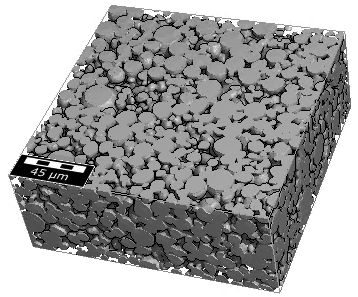
- First, load the structure model obtained from the import (500 x 500 x 200 voxel) in the first part of this tutorial series Import and Quality Control of a Cathode Material. For this, select File → Open Structure (*.gdt, *.gad) from the menu bar. Browse for the Input-Data folder inside the tutorial folder and select the GeoDict structure file ETH-NMC-Cathode.gdt. Click Open. For the visualization settings used in this tutorial, refer to Visualization.
- Select Analyze → PoroDict in the menu bar.
- In the PoroDict section, left from the Visualization area, select Chord Length Distribution from the pull-down menu, and click the Edit button.
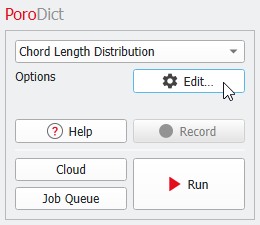
- In the opening dialog, change the Result File Name to ChordLengthPore.gdr.
- Leave the selection of material 00 Electrolyte for Chord MaterialID.
- In the Chord Directions panel select all directions (Direction X, Direction Y, Direction Z, All face diagonals, All volume diagonals).
- Click OK in the dialog and then, click Run in the main GeoDict GUI.
|
Note! The chord length distribution is computed and the file ChordLengthPore.gdr and the folder ChordLengthPore are produced. The results for will be used to compare the original data set with the statistical digital twin, created in the next part of this tutorial series Building a statistical digital twin of a cathode material. |
- Open the Chord Length Distribution dialog again by clicking Edit in the PoroDict section.
- Change the Result File Name to ChordLengthSolid.gdr and select 01 NMC333 from the pull-down menu for Chord MaterialID.

- Click OK in the dialog and then, click Run in the main GeoDict GUI.
|
Note! The chord length distribution is computed and the file ChordLengthSolid.gdr and the folder ChordLengthSolid are produced. The results will be used to compare the original data set with the statistical digital twin, created in the next part of this tutorial series Building a statistical digital twin of a cathode material. |