Set-Up Your Tutorial Project
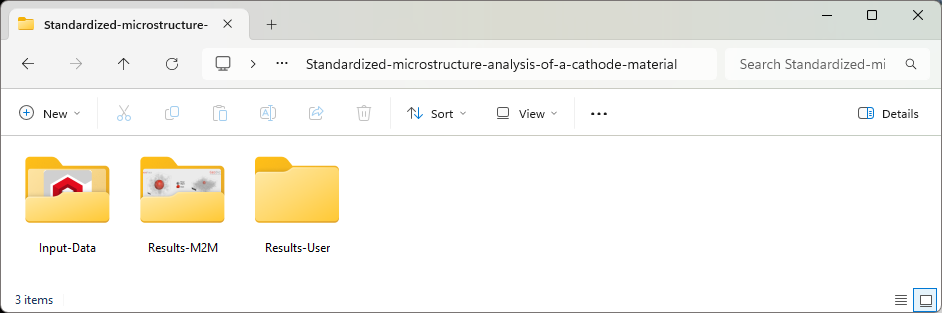
The Standardized-microstructure-analysis-of-a-cathode-material folder contains three folders:
- The Input-Data the original data set ETH-NMC-Cathode.gdt obtained from the first part of this tutorial series (Import and Quality Control of a Cathode Material) by segmenting a 3D-scan.
- The Results-M2M folder contains the results for this tutorial provided by Math2Market (M2M), described below.
- The Results-User folder is empty. We recommend that, before starting to work through this tutorial, you set the Results-User folder as project folder in GeoDict.
 Change Project Folder to Results-User
For this, in the GeoDict GUI, select File > Choose Project Folder > Select Project Folder and navigate to the folder Results-User. In this way, the result files created when running the tutorial will not overwrite the files provided by Math2Market, even when using the same names.
|
Content of Results-M2M Folder
The 10 files and 7 folders inside the folder Results-M2M are described in order of their appearance in the tutorial:
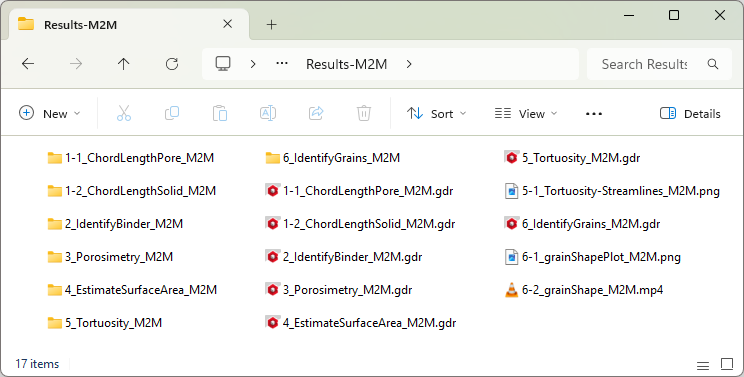
- The 1-1_ChordLengthPore_M2M.gdr file is a GeoDict result file that was created by computing the chord length distribution of the data set, regarding pore space. The structure file lies in the accompanying folder, 1‑1_ChordLengthPore_M2M.
- The 1-2_ChordLengthSolid_M2M.gdr file is a GeoDict result file that was created by computing the chord length distribution of the data set, regarding the solid materials. The structure file lies in the accompanying folder, 1‑2_ChordLengthSolid_M2M.
- The 2_IdentifyBinder_M2M.gdr file is a GeoDict result file created during the identification of the binder in the structure model from the data set using a neural network. The labeled structure lies in the accompanying folder, 2_IdentifyBinder_M2M.
- The 3_Porosimetry_M2M.gdr file is a GeoDict result file created during the analysis of the pore size distribution using the porosimetry method for the structure model from the data set. The detailed data, e.g., the 3D result file, lies in the accompanying folder, 3_Porosimetry_M2M.
- The 4_EstimateSurfaceArea_M2M.gdr file is a GeoDict result file created during the estimation of the surface area in the structure model from the data set. The structure file lies in the accompanying folder, 4_EstimateSurfaceArea_M2M.
- The 5_Tortuosity_M2M.gdr file is a GeoDict result file created during the computation of the tortuosity in the structure model from the data set with labeled binder. The detailed data, e.g., 3D result files, lies in the accompanying folder, 5_Tortuosity_M2M.
- The 5-1_Tortuosity-Streamlines_M2M.png file shows the data set with labeled binder and streamlines from the tortuosity computation.
- The 6_IdentifyGrains_M2M.gdr file is a GeoDict result file created during the identification of the individual grains in the structure model from the data set with labeled binder. The detailed data, e.g., intermediate results of the four stages of the algorithm, lies in the accompanying folder, 6_IdentifyGrains_M2M.
- The 6-1_grainShapePlot_M2M.png file illustrates the scatter of the shapes of the pores as a function of their size.
- The 6-2_grainShape_M2M.mp4 movie file shows the animation of the analysis of the largest five grains in the data set.
|

|
Important! Default settings can vary between the different GeoDict editions, such as the Filtration edition or the Electrochemistry edition. To obtain the same results as presented in this tutorial, set the default settings to the Standard edition by selecting Settings → Reset Current Settings to Built-In Settings → Standard Edition from the menu bar.
|