Output Tab
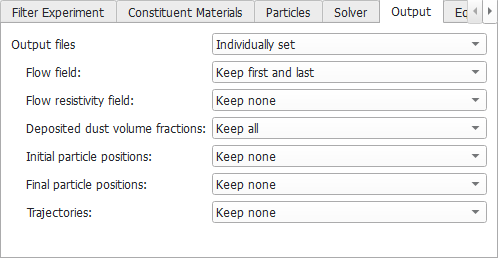
Under the Output tab, we have to select which data is stored during the simulation. We want to be able to visualize the flow field for the clean filter and for the fully clogged filter, so we select Flow field: Keep first and last.
We want to see the distribution of the deposited dust in each time step, so we select Deposited dust volume fractions: Keep all.
We are not interested in the other data, so we select Keep none for all others. There are too many particles simulated in each time step, therefore it is not advisable to store single particle positions or trajectories if you model a complete filter.
Now, we have set the dialog settings in each of the five subtabs. Click OK to close the dialog. Then, click Run in the FilterDict module.