Why 3D Image Visualization Matters in Engineering
created from Anton Du Plessis, Ph.D.
Image visualization is often misunderstood as the creation of visually appealing images – something done by the marketing department or something for conference presentations only. In engineering and materials research, however, visualization serves a fundamentally more important purpose. It is a technical tool for understanding complex 3D data, validating processing steps, and supporting reliable decisions.
Visualization does not replace quantitative analysis, but it complements and supports it. By making structures, phases, and spatial relationships visible, visualization helps users assess whether the data and derived results are physically plausible. In this sense, visualization contributes directly to data trustworthiness. It also provides 3D context – visualizing the distribution of features in an object, such as porosity located along one edge of a sample only, for example. This aspect allows deeper data understanding and insight.
Qualitative Insights from 3D Images
One of the primary roles of 3D visualization is to provide qualitative insight into a dataset. Before numbers are extracted, users need to understand what the material structure actually looks like.
Typical questions addressed through visualization include:
- How are phases distributed in 3D space?
- Are pores, fibers, or particles connected or isolated? Are they overlapping or intertwined?
- Are there visible gradients, defects, or anisotropies?
Interactive tools such as rotating 3D renderings and orthogonal slice views allow users to explore internal structures from multiple perspectives. These views often reveal features that would be difficult to identify from numerical output alone.
Visualization During the Workflow
Visualization plays a critical role throughout the entire image-based workflow, not just at the end.
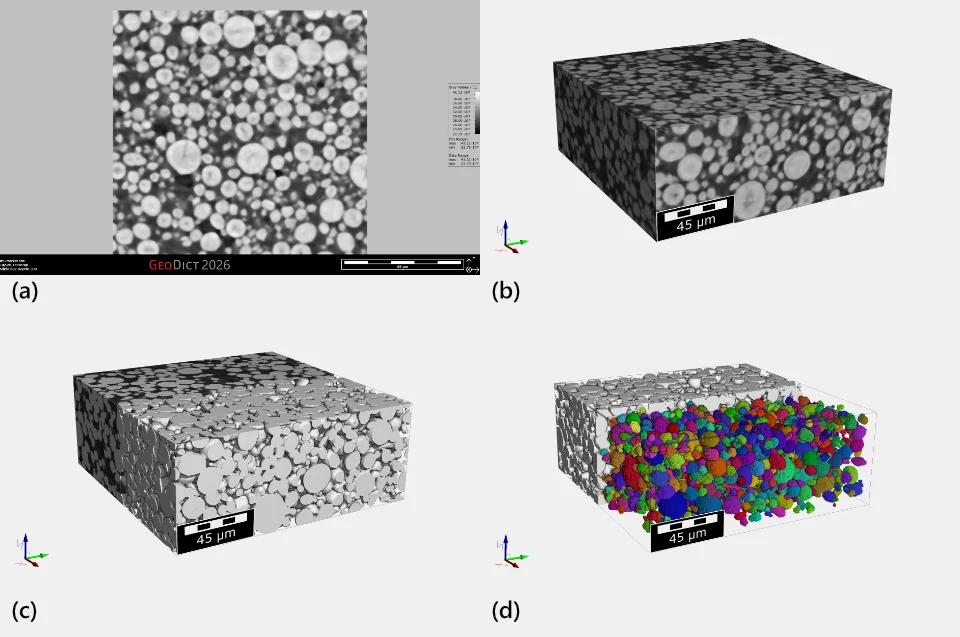
- Visualizing raw images
Early visualization helps assess scan quality, resolution, noise levels, and artifacts. At this point, it is possible to identify immediately obvious features and make assessments when time is of the essence. - Checking filtering results
By comparing images before and after filtering, users can verify that noise is reduced without removing relevant structural details. See also Image Processing. - Validating segmentation quality
Overlaying segmentation results onto the original image makes misclassifications and boundary errors immediately visible. See also Segmentation
At each stage, visualization acts as a control mechanism. It helps identify problems early, before they propagate into quantitative analysis and simulation steps. In this way, visualization prevents systematic errors rather than merely illustrating final results.
Common 3D Visualization Techniques
Different visualization techniques serve different purposes and can also be used in combination.
- Slice views (orthogonal cuts)
Two-dimensional cross-sections through the 3D volume provide detailed local insight and are essential for validation. - Volume rendering
This technique displays the entire volume, often with semi-transparent rendering, revealing internal structures without explicit surface extraction. Clipping of 3D volume renderings is also useful for some visual representations. - Surface rendering
Segmented phases are displayed as smooth surfaces, allowing clear inspection of geometry, interfaces, and connectivity. - Color maps for scalar fields
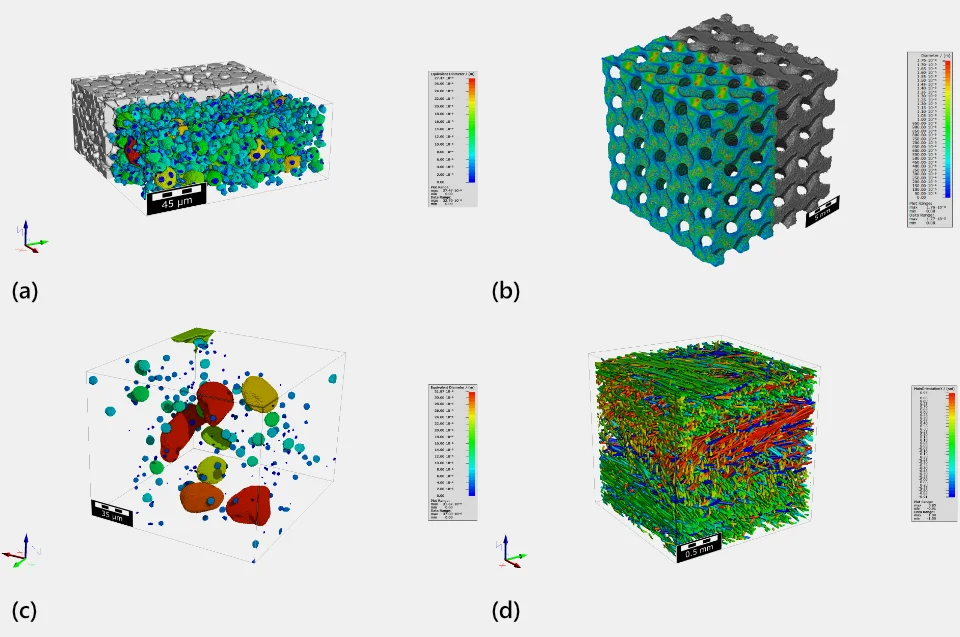
Quantities such as thickness, porosity, particle size, or fiber orientation can be mapped to colors, making spatial variations immediately visible.
Each technique emphasizes different aspects of the data and supports specific analysis and validation tasks. All the above can be represented as still images, or as animations (videos). Animations often provide better 3D context and can be used to rotate the object of interest to see features from different sides, or a clipping tool can be used to “virtually cut open” the sample, revealing internal features.
Visualization for Quantitative Results
Visualization is an essential companion to quantitative analysis. Many computed properties are inherently spatial and benefit from visual representation.
Examples include:
- Thickness maps showing local variations of thickness of objects or of pore spaces
- Fiber orientation fields showing orientations of individual fibers or sections of longer fibers
- Pore size or connectivity distributions mapped back into the structure
- Streamlines representing fluid flow velocities from simulations
- And much more
Color-coded visualizations allow users to interpret numerical results in their spatial context. This not only aids understanding but also helps detect implausible results caused by processing or segmentation errors.